SNT - Entity Management
SNT entity management and configuration documentation
Entity Management System
Overview
This is a page where you can manage entities registered in our system. Entities belong to the categories: Annotation, Asset, People, Sensor, and Vehicle. You can select a category to view entities belonging to that category. This consists of an entity list and an entity edit & create page. Entities can be managed by users or the system. The ideal method is for the system to manage them through source connections.
Entity List Page and Entity Edit/Create Page
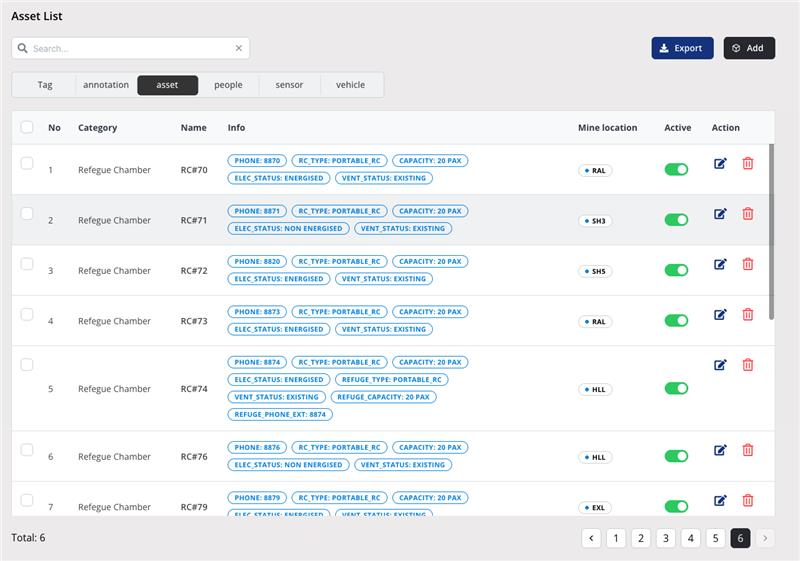
The entity list page consists of Category, Name, Info, Mine Location, Active, and Action.
- Category: Displays the category that the entity belongs to.
- Name: Displays the name of the entity.
- Info: Displays Static Fields of the category that the entity belongs to, if the entity has them. Hover to view detailed information.
- Mine Location: Displays if the entity has a fixed location. Mine Area, Panel, Level, and UTM Coordinate are displayed here. Hover to view detailed information.
- Active: Displays the activation status of the entity.
- Action: Allows you to edit or delete the entity.
Caution
It is recommended not to modify the UTM coordinates of entities. If modified incorrectly, previous values may become unrecoverable. When an entity is deactivated, it is excluded from ADT.