SNT - Source Configuration
SNT source configuration management documentation
Source Configuration Management
Overview
This page is for configuring data sources for categories. It consists of 3 pages: a page to view configurations, a page to set up connections, and a page to map data. You must create a category before configuring.
Create Configuration
- Select the source you want to connect to among API, Database, and MQ (Kafka).
- Click the "Create Config" button.
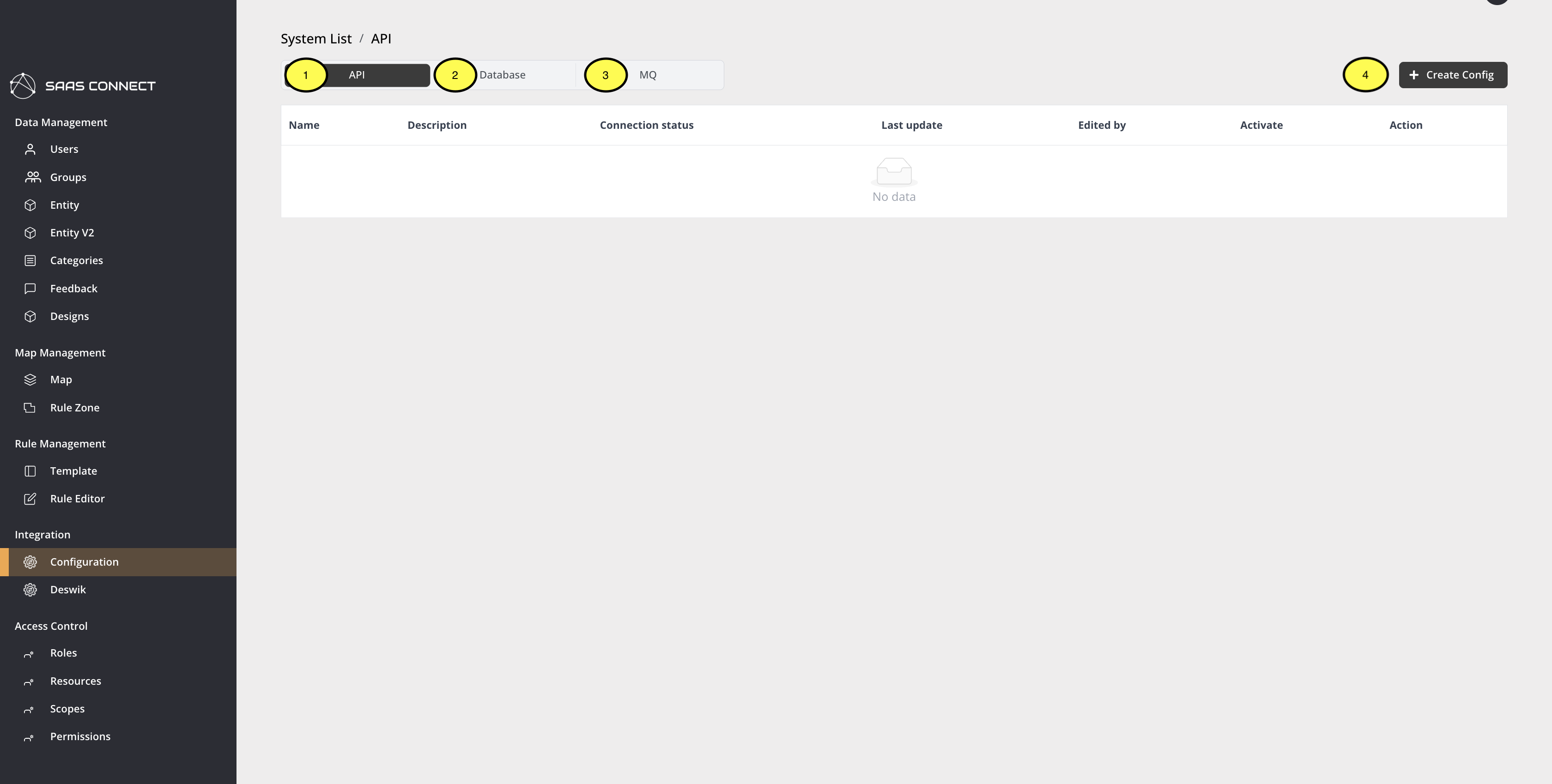
Source Configuration database
-
Specify the name of the configuration.
-
Select a Processor Function from Stream, Dynamic, or Static.
a. Stream is for Kafka messages. b. Dynamic retrieves data at regular intervals and sends it to ADT. c. Static retrieves data at regular intervals and stores it in SNT. -
Enter a description for the configuration.
-
In Type, select how the configuration operates: Schedule, Once, or Message.
-
If Schedule is selected, set the interval (in seconds).
-
Enter the settings required to connect to the source.
-
For Database, enter the query to fetch data.
⚠️ Note: It is recommended that queries return no more than 2000 rows.
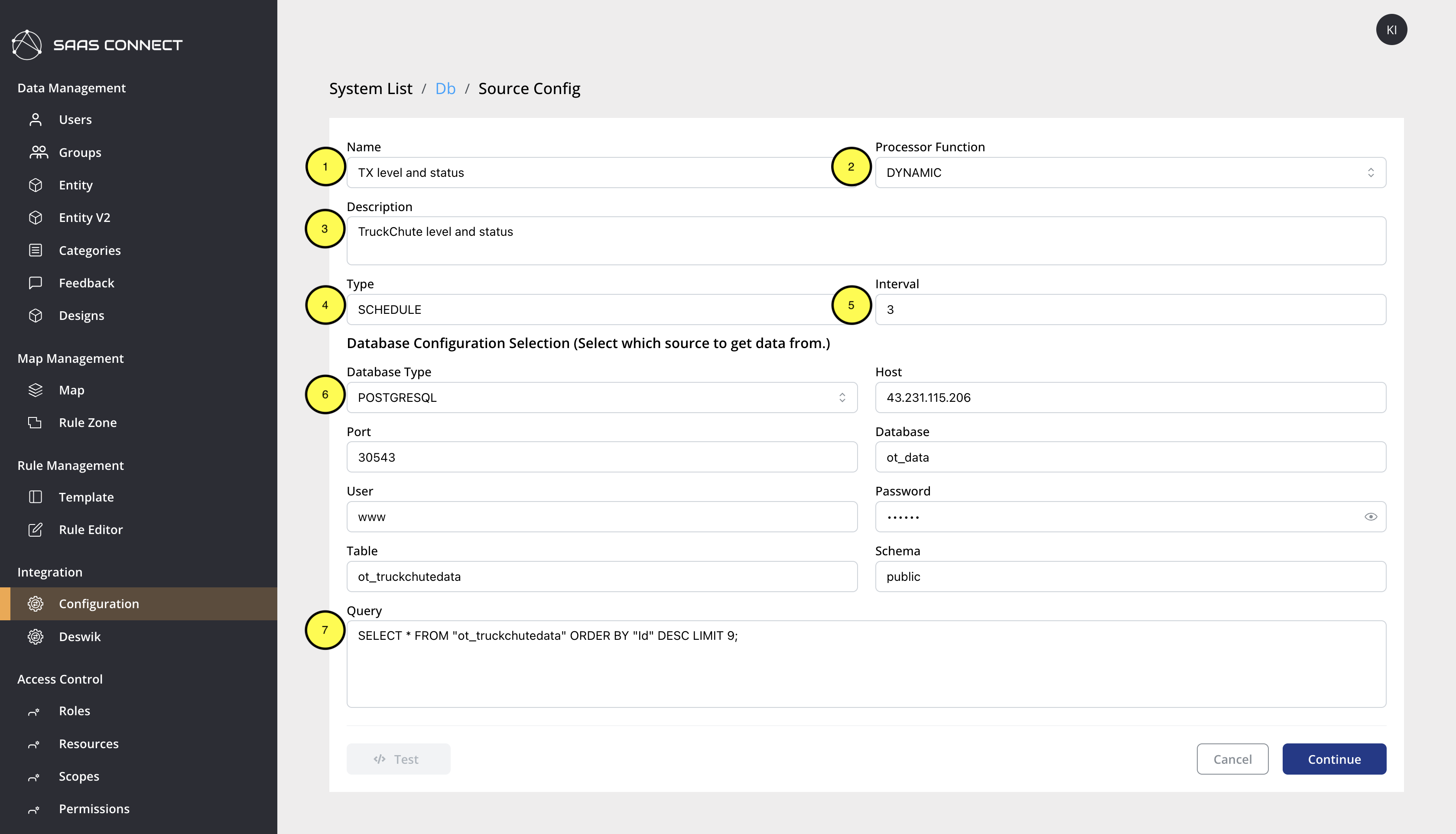
Source Configuration MQ
- Enter the settings for connecting to Kafka.
⚠️ Note: If you do not provide a unique Consumer Group ID in the Group field, messages will be distributed. - Paste a sample message for Kafka.
Fields from the provided JSON will be extracted and used for Data Mapping.
⚠️ Note: If the JSON is corrupted, the fields cannot be extracted.
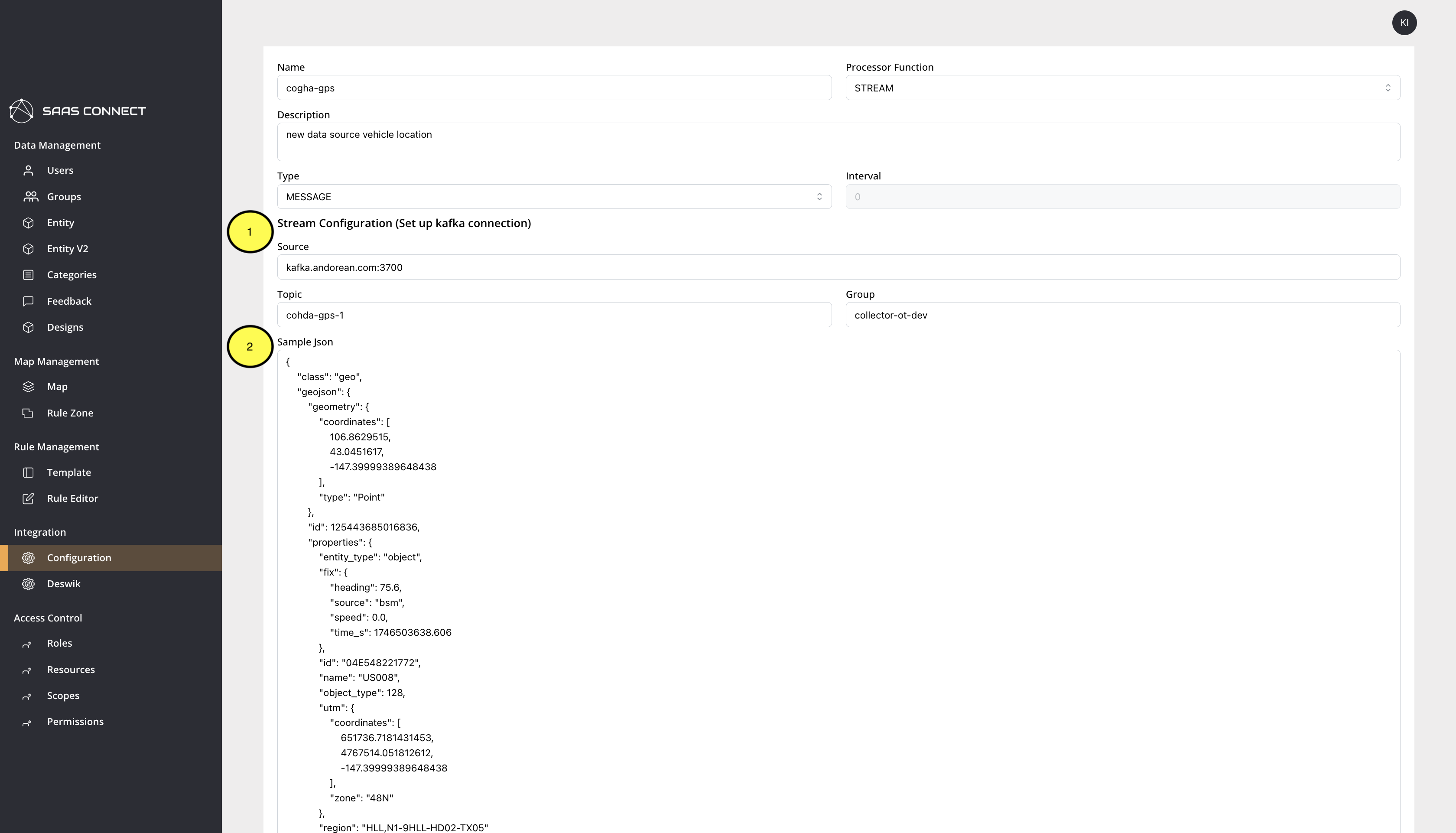
Source Configuration Data mapping
- Select the category to map the source to. Create a category if it does not exist.
- Select the key to join entities. By default, join is based on the name.
- Select the key where the name is located. If the dropdown is empty, there may be a problem with the source connection.
- Select the timestamp key in the data. If the dropdown is empty, there may be a problem with the source connection.
- Select the format of the timestamp key.
- In the category selected in step 1, choose which field will receive the value.
- From the source, choose which field will provide the value for the field selected in step 6.
- If using UTM location, check the box to map the keys.
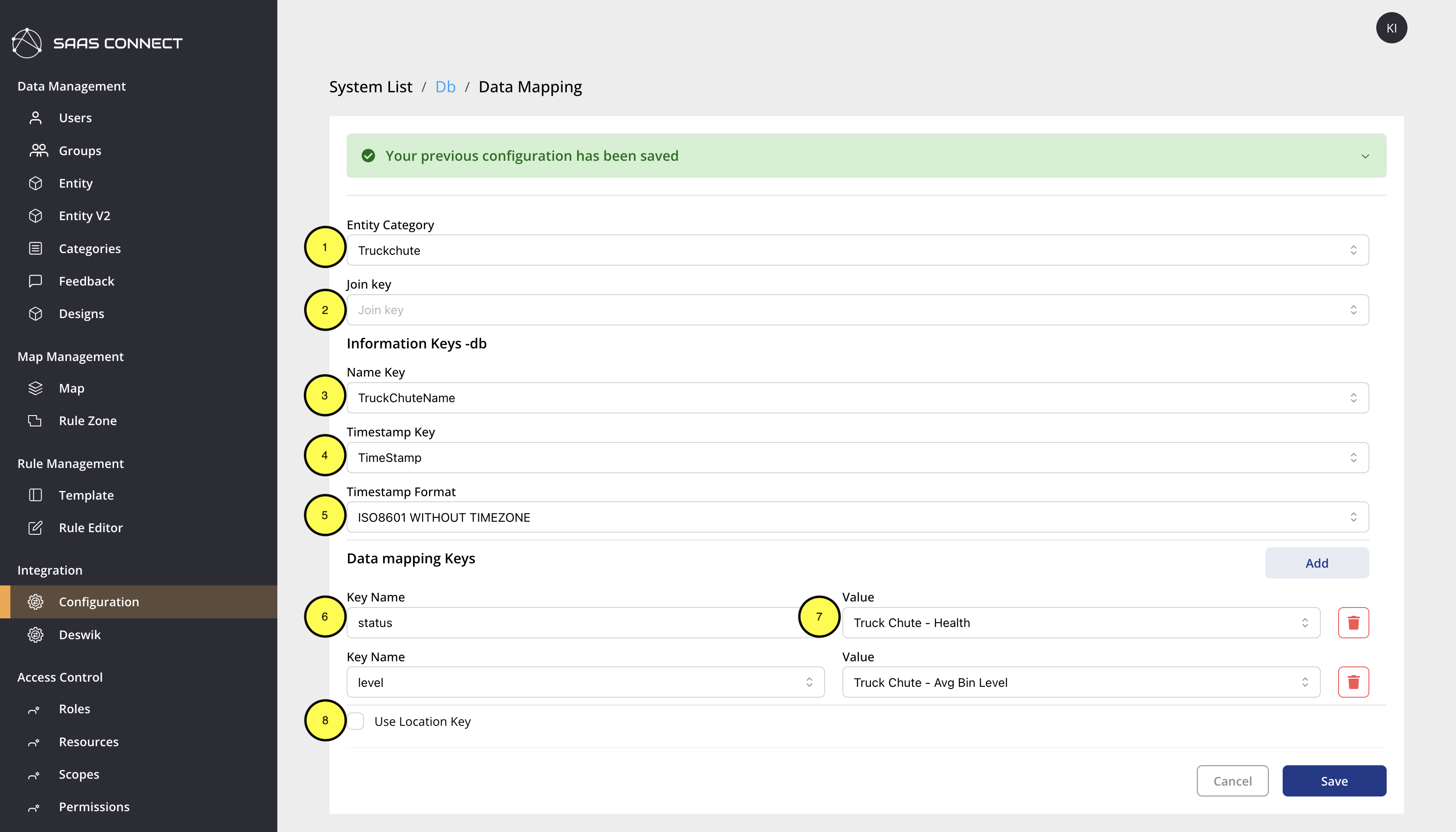
Configuration List Page
On this page, you can view configurations by source. Sources include API, DATABASE (MSSQL, PSQL), and MQ (KAFKA). When you select one of these three, the configurations connected to that source are displayed. The default is API. The list consists of Name, Description, Connection Status, Last Update, Edited By, Activate, and Action.
Name: Represents the name of the configuration. Defined by the user when creating the configuration.
Description: Represents the description of the configuration. Defined by the user when creating the configuration.
Connection Status: Indicates the connection to the source configuration. There are 3 types: ERROR, PENDING, and OK.
- ERROR: The configuration did not work at the scheduled time.
- PENDING: The configuration has not started yet, or has not reached the scheduled operation time.
- OK: Worked properly within the scheduled time.
Last Update: Represents the last modified date.
Edited By: Represents the ID of the person who last modified it.
Activate: Determines whether to activate or deactivate the configuration.
Action: Configuration actions.
Source Config Page
Source config supports API, DATABASE (MSSQL, POSTGRES), and MQ (KAFKA). This is a page for configuring where to get the source from, and currently supports 3 types. All 3 sources commonly have Name, Processor Function, Description, Type, and Interval settings.
Name: The name that defines the configuration.
Processor Function: Configures how to process the retrieved data. There are 3 types: DYNAMIC, STATIC, and STREAM.
- DYNAMIC: Uses timestamps on the retrieved data to only process new data without processing previously processed data. Processing means sending the data to ADT.
- STATIC: A function that statically stores and updates the retrieved data. This is stored in a database.
- STREAM: Like DYNAMIC, it sends to ADT but sends all received data to ADT without checking time.
Description: Defines the description of the configuration.
Type: Selects the execution cycle for the configuration. There are 3 types: SCHEDULE, ONCE, and STREAM.
- SCHEDULE: Configuration that retrieves data at regular intervals.
- ONCE: Configuration that retrieves data only once and ends.
- STREAM: Configuration that continuously retrieves data. Select this when choosing kafka messages.
Interval: The part that sets the cycle for retrieving data. Calculated in seconds.
API
- Method: HTTP method required for API connection
- Host: Host address required for API connection
- Port: Port number required for API connection
- Uri: URI path required for API connection
- Header: HTTP headers required for API connection
- Body: Request body required for API connection
DATABASE
- Database Type: Database type required for database connection
- Host: Host address required for database connection
- Port: Port number required for database connection
- Database: Database name required for database connection
- User: Username required for database connection
- Password: Password required for database connection
- Table: Table name required for database connection
- Schema: Schema name required for database connection
- Query: Query statement to retrieve data from the database
MQ
- Source: Source address required for MQ connection
- Topic: Topic name required for MQ connection
- Group: Group name required for MQ connection
- Sample Json: JSON sample data required for MQ connection
Data Mapping Page
This page configures how to parse and map the retrieved data. "Your previous configuration has been saved" appears with what was configured in the Source Config page. Also, the extracted_keys section appears, which in the case of Database shows the columns of the table, and in the case of MQ shows the keys extracted from the Sample Json. We use these keys for data mapping.
Entity Category
Select which category this source configuration is for.
Name Key
Map the key where the entity name is located in the source.
Timestamp Key
Map the key where the data's timestamp is located in the source.
Timestamp Format
Select the format of the data's timestamp. You can choose from 3 options: Unix, ISO8601 without timezone, and With timezone.
Data Mapping Keys
This consists of Key Name and Value.
Key Name: Can be selected from the Dynamic and Static fields of the category.
Value: Select the key from the source to determine what value to put in the field.
Use Location Keys
If the source has location coordinates, check this to map the keys. Only UTM Coordinate is supported.
Caution
When a source is deactivated, the source connection is terminated. This means data is not transmitted to ADT. This only stops receiving data, it does not delete the corresponding categories and entities from ADT. Data can still be retrieved from the source even with just Source Config. The DP_API_100-114 processor function is supported even with just Source Config. However, using this is not recommended. If you want to use the DP_API_100-114 processor function, it is recommended to contact Andorean.